A tour of the workspace
Where everything lives: the sidebar, the top bar, the company switcher, and the groups that organize a client workspace — Review, Banking, Payables, Receivables, Accounting, Close, Reports, Documents, AI, and Client Settings.
QuickstartFor Business owners, Bookkeepers, Firm staff
The layout
The workspace is three regions: a sidebar on the left, a pinned top bar, and the page itself. The sidebar and the top bar never scroll away, so your client, your company scope, and your position are always visible.
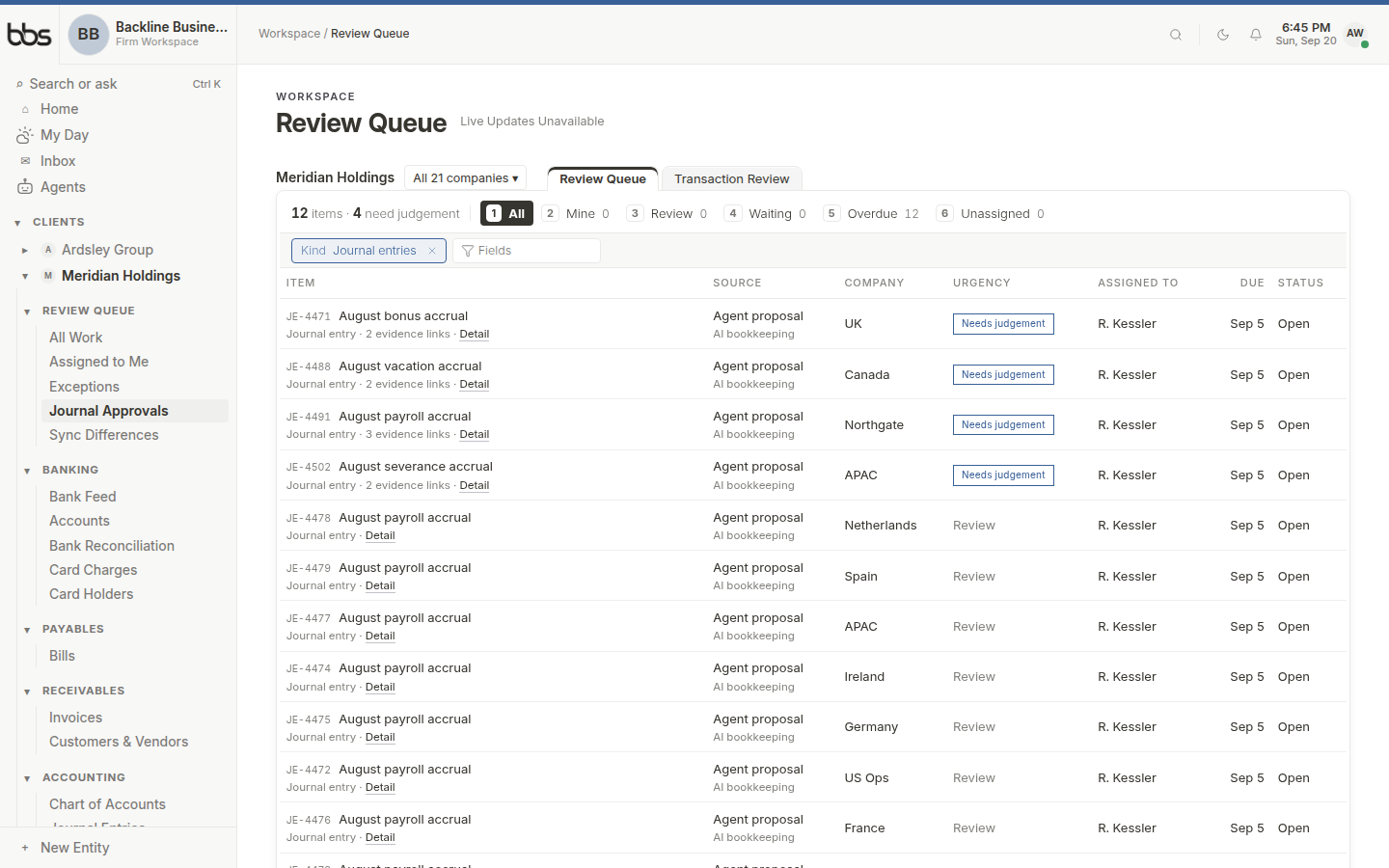
A client workspace. The sidebar (1) holds Firm, Clients, and this client's groups; the top bar (2) shows where you are; the page body (3) is the work surface.
- 1Sidebar
- 2Top bar
- 3Page body
The navigation rail
Firm staff see Home, My Day, and the firm Inbox at the top, then every client they reach, then the Firm group. Open a client and that client's own groups appear in place. A client's own people see only their books — nothing above them.
| Group | Destinations |
|---|---|
| Review Queue | All Work, Assigned to Me, Exceptions, Journal Approvals, Sync Differences |
| Banking | Bank Feed, Accounts, Bank Reconciliation, Card Charges, Card Holders |
| Payables | Bills |
| Receivables | Invoices, Customers & Vendors |
| Accounting | Chart of Accounts, Journal Entries, Recurring Journals, Transactions |
| Close | One folder per closing month — statements, eliminations, intercompany |
| Reports | Statements & Schedules, Cash Position, Report Packages, Consolidated Reporting |
| Documents | Document Library, Client Inbox |
| AI | Client Agents, AI Activity, Bea, Assistant |
| Client Settings | Companies, People & Access, Provider Connections, Company Onboarding, Client Portal, AI Rules |
Review Queue is the daily work surface. Bank Feed is where every observed bank line is decided. Close is a folder for a month, not a global date picker — opening August shows August, and nothing else in the product is filtered by that month until you are inside that folder.
The header band
The top bar carries breadcrumbs and page actions. It is pinned, so scrolling a long register never costs you the knowledge of where you are. The page title stays in the scrolling content.
Company scope lives in the URL as `entities`. Changing companies re-scopes the current page in place rather than sending you home. Period is not a global filter: a closing-month folder shows that month, and a report asks for its own dates.
The daily rhythm
Most days do not start on the client home. They start in Review Queue and the Bank Feed, which are built as work queues rather than dashboards.
A typical morning pass through the workspace:
- 1
Open My Day if you work at the firm, or Assigned to Me inside the client.
This is your personal queue: review items assigned to you, and anything that landed overnight.
- 2
Clear Exceptions.
Machine work that could not post is here. These are usually fast — a missing account, an unmapped vendor — and clearing them lets automation resume.
- 3
Work the Bank Feed.
Every observed bank line waits here until someone decides what it is. Proposed coding is visible; nothing posts until it is accepted.
- 4
Glance at Reports or the current Close folder.
Cash position, open bills, and whether the month is ready to lock.
Common questions
Open the client in the sidebar and expand the group that owns it: Bank Reconciliation lives under Banking, Journal Entries under Accounting, Consolidated Reporting under Reports, People & Access under Client Settings.
Instant search is faster than hunting. Press ⌘K (Ctrl K) in the workspace, or use the search dialog on this help centre.
Approvals are human-prepared documents waiting for a human decision. Exceptions are machine-originated events that could not safely post and need a human to unblock them. They are deliberately separate queues because they call for different judgement.
Was this useful?