Categorizing the transaction feed
Turning raw bank activity into posted entries: what the AI proposes, how to review efficiently, matching against open bills and invoices, and building rules that hold up.
How-toFor Bookkeepers, Business owners, Firm staff
What categorizing does
A transaction in the feed is not yet in your books. Categorizing it posts a journal entry: one side hits the bank account's ledger account, the other hits whatever account you code it to. Until then it is a fact about your bank, not a fact about your business.
This is the highest-volume work in most books, which is why Bank Feed is built for speed and why automation targets it first.
Working the review queue
Bank Feed is the desk. It presents every observed bank line with a proposed coding already filled in where the system is confident. Your job is to confirm, correct, or investigate — in that order of frequency.
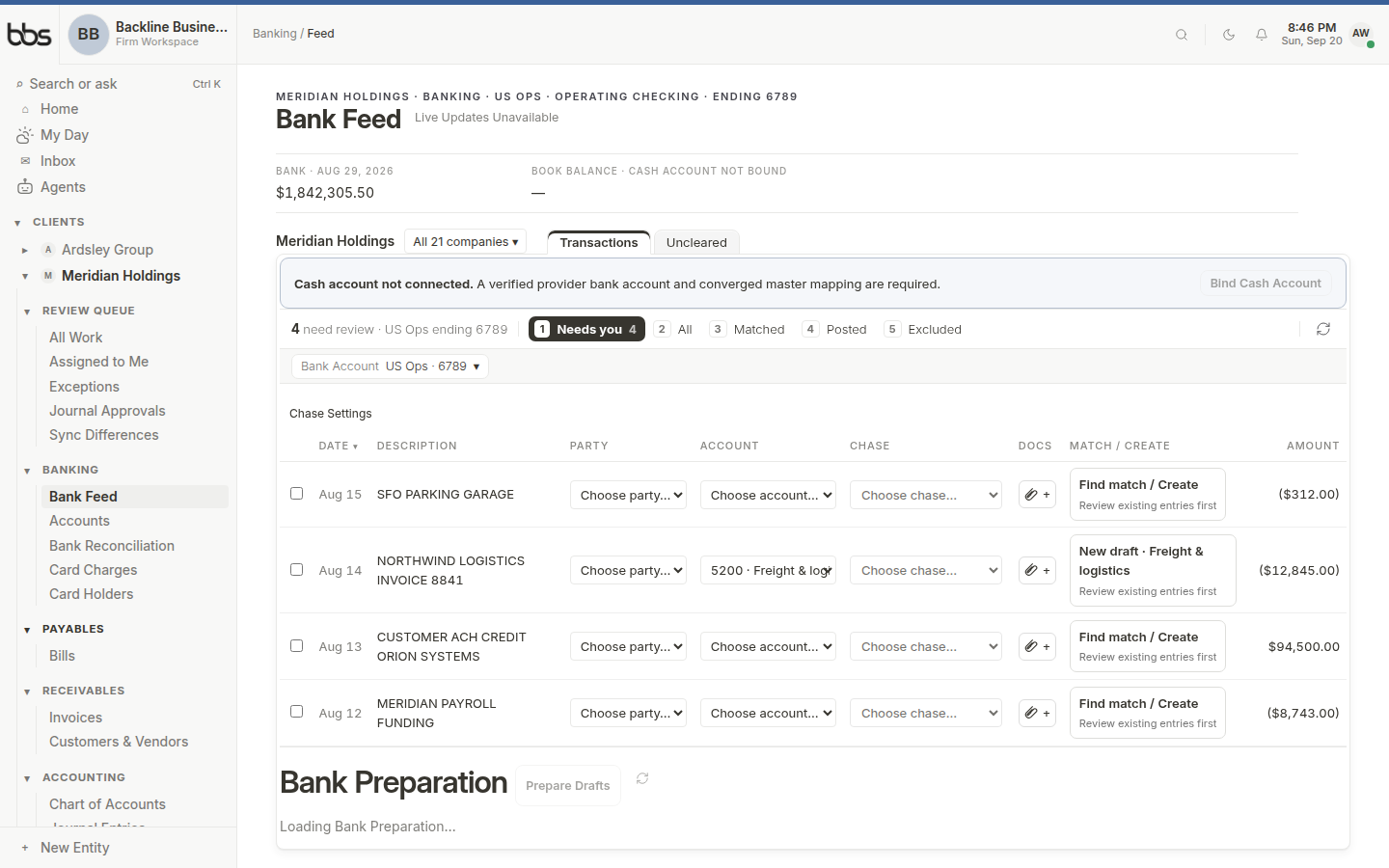
Bank Feed is where every new line is decided. Proposed coding sits in the account column; matches to open bills and invoices sit beside it.
- 1Date and description from the bank
- 2Proposed account
- 3Match to an open bill or invoice
- 4Confirm selected
An efficient pass:
- 1
Sort or filter to the highest-confidence proposals and confirm them in bulk.
Recurring vendors you have coded the same way for months are the bulk of most feeds.
- 2
Handle matches to open bills and invoices next.
A payment matched to a bill settles that bill, rather than posting a duplicate expense. This is the single most important thing to get right in the feed.
- 3
Work the remainder individually.
These are new vendors, unusual amounts, and transfers. They deserve the attention they are taking.
- 4
Send anything you genuinely cannot resolve to exceptions.
Better a documented open question than a plausible guess that nobody revisits.
Matching, not double-recording
| The bank shows | If the document exists in myBBS | If it does not |
|---|---|---|
| Money out to a vendor | Match it to the open bill — it settles A/P. | Code to the expense account. |
| Money in from a customer | Match it to the open invoice — it settles A/R. | Code to the revenue account. |
| Money between your own accounts | Code as a transfer, hitting both bank accounts. | Same — never code a transfer to income or expense. |
| A payroll debit | Match it to the payroll run's entry. | Investigate — an unmatched payroll debit usually means the run has not posted. |
Rules that hold up
A rule codes matching transactions automatically. Good rules are specific enough that you would have made the same decision by hand every time.
Rules worth creating:
- A single vendor that always codes to one account — a landlord, an insurer, a utility.
- Bank fees and interest, which are unambiguous and high-volume.
- Merchant deposits from one processor, which always land in the same clearing account.
- Subscriptions on a fixed amount, matched on both description and amount.
Rules that will cause trouble:
- Broad keyword matches like anything containing "payment".
- Rules on a vendor you buy several different things from — office supplies and computer equipment from the same store belong in different accounts.
- Rules that fire on amounts alone.
- Rules that bypass matching to open bills, which recreates the double-recording problem automatically and at scale.
Common questions
Open the transaction and add lines. A card payment covering supplies, software, and meals should be split rather than coded to whichever account is largest — the split is what makes the P&L worth reading.
Recategorize it. The prior entry is reversed and the new one posted, with both visible in the audit trail. You do not need to hand-write a reversing journal entry.
See alsoCorrecting a posted entry
Card processors deposit net of fees, and often in batches that do not match individual invoices. Code the gross to a clearing account, code the fees to an expense account, and let the clearing account net to zero — that way both revenue and fees are recorded at full value.
Automation stopped because it could not resolve something safely — an account that does not exist, a period that is locked, an ambiguous match. The exception states the reason, and clearing it lets the work resume.
See alsoThe Exceptions queue
Was this useful?